

+1 (332) 900-1500
Note: this setting available only for Circle administrators
Yes. Circle administrators can define which server will be set as a default for storing Patient’s PI data, including all answers to PI questions, once an investigator is creating a new case for this Circle. At the moment, you can select the following options/servers for your Circle:
➢ USA
➢ CA (Canada)
➢ Investigator’s (matches the investigator’s PI region)
To define the PI server for your Circle:
1. Navigate to Circles and select the required one from the list
2. Click EDIT
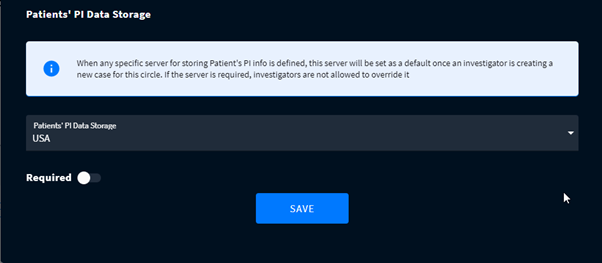
3. At the bottom of the Edit Circle modal, select the required Patients' PI Data Storage
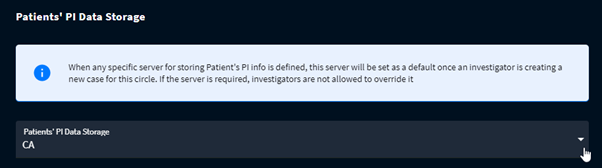
4. To restrict your Circle members to change the server for another one, switch on the toggle Required.
➢ Self-enrolled patient registered in the Circle with ‘Investigator’s PI Data Storage’ gets the PI Region of the inviting Investigator.
➢ Self-enrolled patient registered in the Circle with defined PI Region gets this Circle's PI region for their data storage.
➢ Already existing in the system patients save their PI region for the newly created cases regardless of the Circle's PI Region settings.
➢ Patient added by a team member inherits the Investigator's PI region regardless of the team member's PI region settings.
Search keywords:
Tomorrow's Healthcare Decisions. Todays's Real World Evidence.
